order-application
本架構是一個秒殺應用的架構,用於處理高併發的訂單請求,確保系統的穩定性和高可用性
架構圖
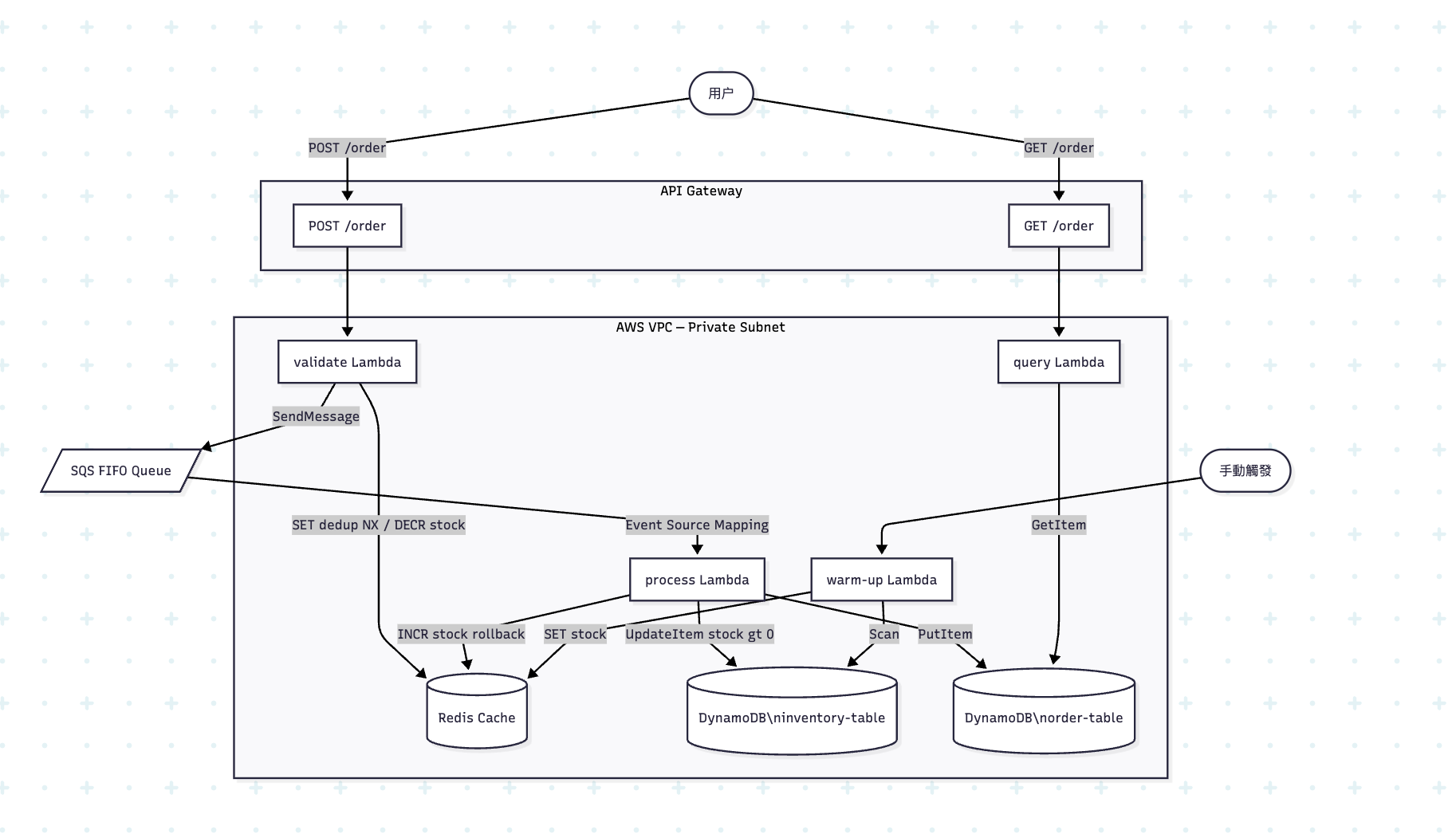
架構說明
Warm up Lambda
在接受用戶請求之前,需要先把庫存數據從 DynamoDB 加載到 Redis,否則 Redis 裡沒有庫存數據,所有下單請求都會返回 out of stock。
運維手動觸發 warm-up Lambda
        │
        ▼
① 掃描 DynamoDB inventory-table
   └── 讀取所有商品的 itemId 和 stock 數量

        │
        ▼
② 寫入 Redis
   └── 對每個商品執行:SET stock:{itemId} {stock數量}
   例:SET stock:item-001 100

        │
        ▼
③ 處理分頁(inventory-table 超過 1MB 時自動翻頁)
   └── 直到所有商品全部寫入 Redis

        │
        ▼
④ 返回結果
   └── {"message": "warm up complete", "loaded": 100}

此時Redis中的狀態
```hcl
stock:item-001 = 100
stock:item-002 = 50
stock:item-003 = 200
下單
用戶發送請求
POST https://<api-url>/prod/order
Body: {"userId": "user-001", "itemId": "item-001"}

        │
        ▼
API Gateway (Regional)
├── 檢查 Usage Plan 限速(rate_limit / burst_limit)
│   └── 超速則直接斷開連接(ECONNRESET)
└── 通過 Lambda Proxy 集成轉發給 validate Lambda
    └── 將 HTTP 請求封裝成 Lambda event:
        {
          "body": "{\"userId\": \"user-001\", \"itemId\": \"item-001\"}",
          "httpMethod": "POST",
          ...
        }
validate Lambda
validate Lambda 收到 event
        │
        ▼
① 解析請求體
   └── 提取 userId = "user-001", itemId = "item-001"
   └── 缺少任一字段 → 返回 400 Missing userId or itemId

        │
        ▼
② 去重檢查(Redis)
   └── 命令:SET dedup:user-001:item-001 1 NX EX 600
       ├── NX = 只在 key 不存在時才設置
       └── EX 600 = 10 分鐘後自動過期

   ┌── 設置失敗(key 已存在)→ 該用戶 10 分鐘內已下過單
   │   └── 返回 429 Duplicate request ignored
   │
   └── 設置成功 → 繼續往下

        │
        ▼
③ 扣減 Redis 庫存
   └── 命令:DECR stock:item-001
       ├── 返回值 >= 0 → 庫存充足,繼續
       └── 返回值 < 0  → 庫存不足,回滾並返回 400
           └── 回滾:INCR stock:item-001(還原庫存)

        │
        ▼
④ 發送消息到 SQS FIFO Queue
   └── MessageBody: {"userId": "user-001", "itemId": "item-001"}
   └── MessageGroupId: "item-001"(同一商品的消息順序處理)
   └── MessageDeduplicationId: "user-001:item-001"(SQS 層去重)

        │
        ▼
⑤ 返回 200 Purchase request accepted
此時系統狀態:
Redis:  stock:item-001 = 99(已扣減)
        dedup:user-001:item-001 = 1(TTL 600s)
SQS:    隊列中有一條消息 {"userId": "user-001", "itemId": "item-001"}
DynamoDB: 暫無變化
三、異步處理:SQS → process Lambda
validate Lambda 返回響應後,用戶側的請求已結束。SQS 觸發 process Lambda 是異步進行的。
SQS FIFO Queue 有新消息
        │
        ▼
觸發 process Lambda(Event Source Mapping)
└── batch_size = 10(每次最多處理 10 條消息)
└── maximum_concurrency = 100

        │
        ▼
process Lambda 處理每條消息

① 解析消息
   └── userId = "user-001", itemId = "item-001"
   └── orderId = "user-001:item-001"

        │
        ▼
② DynamoDB 條件扣庫存(第二道防線,防超賣)
   └── 操作 inventory-table:
       UpdateExpression: SET stock = stock - 1
       ConditionExpression: stock > 0

   ┌── 條件滿足(stock > 0)→ 扣減成功,繼續
   │
   └── 條件不滿足(stock = 0)→ ConditionalCheckFailedException
       ├── 回滾 Redis:INCR stock:item-001(還原 Redis 庫存)
       └── 寫入訂單:status = "failed", reason = "out of stock"

        │
        ▼
③ 寫入訂單記錄到 DynamoDB order-table
   └── 成功時:
       {
         "orderId": "user-001:item-001",
         "userId": "user-001",
         "itemId": "item-001",
         "status": "success"
       }
   └── 失敗時:
       {
         "orderId": "user-001:item-001",
         "userId": "user-001",
         "itemId": "item-001",
         "status": "failed",
         "reason": "out of stock"
       }

        │
        ▼
④ 消息處理完成,SQS 自動刪除該消息
此時系統狀態:
Redis:    stock:item-001 = 99
DynamoDB: inventory-table: stock = 99
          order-table: {orderId: "user-001:item-001", status: "success"}
SQS:      消息已刪除
四、查詢流程:GET /order
用戶下單後想知道訂單是否處理成功,發起查詢請求。
用戶發送請求
GET https://<api-url>/prod/order?userId=user-001&itemId=item-001

        │
        ▼
API Gateway → query Lambda

        │
        ▼
① 解析 Query String 參數
   └── userId = "user-001", itemId = "item-001"
   └── 缺少任一字段 → 返回 400

        │
        ▼
② 查詢 DynamoDB order-table
   └── Key: {orderId: "user-001:item-001", userId: "user-001"}

   ┌── 查不到記錄 → 訂單還在 SQS 隊列中,尚未處理
   │   └── 返回 200 {"status": "processing", "message": "order is still in queue"}
   │
   ├── status = "success"
   │   └── 返回 200 {"status": "success", "message": "order placed successfully"}
   │
   └── status = "failed"
       └── 返回 200 {"status": "failed", "message": "out of stock"}
網絡路徑(important)
所有的lambda函數的vpc config都設置在VPC private subnet內部,沒有公網訪問能力,所以要通過以下路徑訪問AWS服務:
Validate Lambda
- Redis: 走VPC內網(同一個subnet,安全組放行6379端口)
- SQS: 走VPC Interface Endpoint(com.amazonaws.us-east-1.sqs),安全組放行443端口
Process Lambda
- Redis: 同上
- DynamoDB: 走VPC Gateway Endpoint(com.amazonaws.us-east-1.dynamodb),路由表指向Endpoint
- CloudWatch Logs: 走VPC Interface Endpoint(com.amazonaws.us-east-1.logs),安全組放行443端口
Query Lambda
- DynamoDB: 同上
- CloudWatch Logs: 同上
Warm-up Lambda
- DynamoDB: 同上
- Redis: 同上
- CloudWatch Logs: 同上
所有流量不經過公網,通過AWS內網骨幹傳輸
防止超賣的機制
Flash Sale的核心問題是超賣,本架構使用兩道防線來防止超賣:
Redis DECR
- 原子操作,速度極快(微秒級)
- 高併發下靠Redis單線程串行處理,確保不會出現庫存數量錯亂
- 問題:Redis是內存數據庫,重啟後數據會丟失,需要Warm-up 同步數據
DynamoDB條件寫入(Process Lambda)
- ConditionExpression: stock > 0, 確保只有庫存充足時才扣減成功
- 保證原子性,即使Redis數據出錯,也不會超賣
- 作用:兜底,防止Redis數據不一致導致的超賣情況
架構時序圖
用户          API GW       validate      Redis        SQS         process      DynamoDB
 │              │            │             │            │             │             │
 │──POST /order▶│            │             │            │             │             │
 │              │──invoke───▶│             │            │             │             │
 │              │            │──SET dedup─▶│            │             │             │
 │              │            │◀────OK──────│            │             │             │
 │              │            │──DECR stock▶│            │             │             │
 │              │            │◀────99──────│            │             │             │
 │              │            │──SendMessage────────────▶│             │             │
 │              │            │◀────OK───────────────────│             │             │
 │◀──200 accepted────────────│             │            │             │             │
 │              │            │             │            │──trigger───▶│             │
 │              │            │             │            │             │──UpdateItem▶│
 │              │            │             │            │             │◀────OK───────│
 │              │            │             │            │             │──PutItem───▶│
 │              │            │             │            │             │◀────OK───────│
 │              │            │             │            │◀──delete msg│             │
 │              │            │             │            │             │             │
 │──GET /order─▶│            │             │            │             │             │
 │              │──invoke query Lambda     │            │             │             │
 │              │            │             │            │             │──GetItem───▶│
 │              │            │             │            │             │◀─{success}──│
 │◀──200 success─────────────────────────────────────────────────────│             │
資源配置
API Gateway:
resource "aws_api_gateway_rest_api" "qsy_api" {
    name = "qsy-api"
    body = jsonencode({
        openapi = "3.0.1"
        info = {
            title = "qsy_api"
            version = "1.0"
        }

        paths = {
            "/order" = {
                post = {
                    x-amazon-apigateway-integration = {
                        type             = "AWS_PROXY"
                        payloadFormatVersion = "1.0"
                        httpMethod       = "POST"
                        uri              = var.qsy_lambda_invoke_arn
                    }
                }
                get = {
                    x-amazon-apigateway-integration = {
                        type             = "AWS_PROXY"
                        payloadFormatVersion = "1.0"
                        httpMethod       = "POST"
                        uri              = var.query_lambda_invoke_arn
                    }
                }
            }
        }
    })

    endpoint_configuration {
        types = ["REGIONAL"]
    }
}

resource "aws_api_gateway_deployment" "api_deploy" {
    rest_api_id = aws_api_gateway_rest_api.qsy_api.id

    triggers = {
        redeployment = sha1(jsonencode(aws_api_gateway_rest_api.qsy_api.body))
    }

    lifecycle {
        create_before_destroy = true
    }
}


resource "aws_api_gateway_stage" "qsy" {
    deployment_id = aws_api_gateway_deployment.api_deploy.id
    rest_api_id = aws_api_gateway_rest_api.qsy_api.id
    stage_name = "prod"
}


resource "aws_api_gateway_usage_plan" "usage" {
    name = "qsy-usage-plan"
    description = "Usage plan for qsy API"
    product_code = "MYCODE"
    api_stages {
        api_id = aws_api_gateway_rest_api.qsy_api.id
        stage = aws_api_gateway_stage.qsy.stage_name
    }

    quota_settings {
        limit = 1000
        period = "WEEK"
    }

    throttle_settings {
        burst_limit = 200-
        rate_limit = 300
    }
}
- aws_api_gateway_rest_api: 定義API Gateway的API結構,包括路徑、方法和集成方式,但是本身不會創建對外的URL,只是單純地定義api的結構。
- aws_api_gateway_deployment: 是api配置的一次快照,會把當前的REST API打包成一個可以部署的版本,為了讓每次修改API配置都能自動部署,我們使用triggers來觸發新的部署,這裡的triggers是根據REST API的body內容生成一個hash值,每次修改API配置都會導致body內容變化,從而觸發新的部署。
- aws_api_gateway_stage: 定義API的部署階段,將特定版本的API與一個階段名稱關聯起來,這樣就可以通過階段名稱來訪問特定版本的API,例如prod/dev/beta,這樣才會對外暴露URL。
output "api_gateway_execution_arn"{
    value = aws_api_gateway_rest_api.qsy_api.execution_arn
    description = "The execution ARN of the API Gateway REST API."
}


output "api_gateway_url"{
    value = aws_api_gateway_stage.qsy.invoke_url
    description = "The URL of the API Gateway stage to invoke the API."
}
- api_gateway_execution_arn: execution_arn - Execution ARN part to be used in lambda_permission's source_arn when allowing API Gateway to invoke a Lambda function, e.g., arn:aws:execute-api:eu-west-2:123456789012:z4675bid1j, which can be concatenated with allowed stage, method and resource path.
- api_gateway_url: URL to invoke the API pointing to the stage, e.g., https://z4675bid1j.execute-api.eu-west-2.amazonaws.com/prod
VPC & Lambda Networking
resource "aws_security_group" "process_lambda_sg" {
    name = "process-lambda-sg"
    description = "Security group for the process Lambda function"
    vpc_id = aws_vpc.qsy_vpc.id
    tags = {
        Name = "process-lambda-sg"
    }
}

resource "aws_vpc_security_group_egress_rule" "process_lambda_engress_for_redis" {
    security_group_id = aws_security_group.process_lambda_sg.id
    ip_protocol = "tcp"
    from_port = 6379
    to_port = 6379
    cidr_ipv4 = aws_vpc.qsy_vpc.cidr_block
}

resource "aws_vpc_security_group_egress_rule" "process_lambda_engress_for_443" {
    security_group_id = aws_security_group.process_lambda_sg.id
    ip_protocol = "tcp"
    from_port = 443
    to_port = 443
    cidr_ipv4 = "0.0.0.0/0"
}
# SQS Interface Endpoint
resource "aws_vpc_endpoint" "sqs" {
  vpc_id              = aws_vpc.qsy_vpc.id
  service_name        = "com.amazonaws.${var.region}.sqs"
  vpc_endpoint_type   = "Interface"
  subnet_ids          = [aws_subnet.private_qsy_subnet.id]
  security_group_ids  = [aws_security_group.vpc_endpoint_sg.id]
  private_dns_enabled = true
}

# CloudWatch Logs Interface Endpoint
resource "aws_vpc_endpoint" "cloudwatch_logs" {
  vpc_id              = aws_vpc.qsy_vpc.id
  service_name        = "com.amazonaws.${var.region}.logs"
  vpc_endpoint_type   = "Interface"
  subnet_ids          = [aws_subnet.private_qsy_subnet.id]
  security_group_ids  = [aws_security_group.vpc_endpoint_sg.id]
  private_dns_enabled = true
}

# STS Interface Endpoint (Lambda 在 VPC 中需要 STS 取得 IAM 臨時憑證)
resource "aws_vpc_endpoint" "sts" {
  vpc_id              = aws_vpc.qsy_vpc.id
  service_name        = "com.amazonaws.${var.region}.sts"
  vpc_endpoint_type   = "Interface"
  subnet_ids          = [aws_subnet.private_qsy_subnet.id]
  security_group_ids  = [aws_security_group.vpc_endpoint_sg.id]
  private_dns_enabled = true
}

# 給 Interface Endpoint 用的 Security Group
resource "aws_security_group" "vpc_endpoint_sg" {
  name        = "vpc-endpoint-sg"
  description = "Security group for VPC Interface Endpoints"
  vpc_id      = aws_vpc.qsy_vpc.id

  tags = {
    Name = "vpc-endpoint-sg"
  }
}

# 允許 VPC 內部的 443 流量進入 Endpoint
resource "aws_vpc_security_group_ingress_rule" "endpoint_ingress" {
  security_group_id = aws_security_group.vpc_endpoint_sg.id
  ip_protocol       = "tcp"
  from_port         = 443
  to_port           = 443
  cidr_ipv4         = aws_vpc.qsy_vpc.cidr_block
}
這段代碼定義了三個Interface Endpoint,分別用於SQS、CloudWatch Logs和STS服務,這些Endpoint允許在VPC內部的Lambda函數安全地訪問這些AWS服務,而不需要通過公網。每個Endpoint都關聯了一個安全組aws_security_group.vpc_endpoint_sg,該安全組允許來自VPC內部的443端口流量,確保只有VPC內的資源可以訪問這些Endpoint。
底層邏輯:這些Interface Endpoint能讓Lambda能連接到SQS、CloudWatch Logs和STS服務的私有IP地址,底層是在vpc中安置了一個插座(ENI),ENI有一個vpc內部的私有IP,lambda實際連接的是這個私有IP,完全不知道背後是AWS服務。
aws_vpc_endpoint (Interface 類型)
        │
        │ AWS 自動建立
        ▼
ENI (Elastic Network Interface)
└── 在 private_qsy_subnet 裡分配一個內網 IP
└── 這個 IP 就是 SQS / CloudWatch / STS 在 VPC 內的「地址」
其中最關鍵的一個參數是private_dns_enabled = true,這樣Lambda在訪問sqs.amazonaws.com時會自動解析到VPC Endpoint的私有IP地址,從而實現完全內網訪問AWS服務的效果。
而筆者在完成這個架構的時候,還遇到了一個問題,就是關於lambda的性質。
AWS Lambda預設在AWS管理的vpc中(不屬於我的帳戶),無法直接訪問存取我vpc裡面的私有資源。
要讓Lambda能夠存取到我的vpc內的資源,最標準的做法是把Lambda連結到我的VPC Private Subnet中,這時候Lambda會在我指定的子網中建立ENI,讓函數像一般ENI一樣透過私有IP與vpc內的資源溝通。
這時候我遇到了一個問題,第一次terraform apply的時候,lambda創建出現了timeout,因為lambda要創建ENI,而此時lambda沒有VPC存取權限,也就是AWsLambdaVPCAccessExecutionRole裡面沒有ec2:CreateNetworkInterface的權限,所以lambda無法創建ENI,導致創建失敗。
完整的附加了AWS管理的policy必須要有:
- ec2:CreateNetworkInterface
- ec2:DescribeNetworkInterfaces
- ec2:DeleteNetworkInterface
如果自己定義一個policy的話,必須要有以上三個權限,才能讓lambda在VPC中正常運行。
還有一個資源是aws_lambda_permission,API Gateway本身沒有IAM Role,它並不是用identity去呼叫lambda的,所以沒辦法在API Gateway側定義一個IAM Role來授權。
唯一的辦法是在lambda這邊定義一個aws_lambda_permission,授權API Gateway的ARN可以呼叫這個lambda函數,這裡的source_arn就是API Gateway的execution ARN,這樣就完成了授權。
還有一個資源是aws_lambda_event_source_mapping,這個資源是用來定義SQS觸發Lambda的,當SQS隊列有新消息時,會自動觸發Lambda函數來處理消息,這裡需要指定SQS隊列的ARN和Lambda函數的ARN,以及一些參數來控制批量處理的行為,例如batch_size和maximum_concurrency。
具體來說是lambda服務輪詢SQS隊列有沒有新消息,不需要aws_lambda_permission。
其具體流程如下:
aws_lambda_event_source_mapping 建立後
        │
        ▼
Lambda 服務(AWS 管理層)開始輪詢
        │
        │ 每隔一段時間
        ▼
sqs:ReceiveMessage → 檢查隊列有沒有消息
        │
        ├── 沒有消息 → 繼續等待
        │
        └── 有消息 → 觸發 Lambda 執行
                │
                ▼
            Lambda 處理完
                │
                ▼
            sqs:DeleteMessage → 刪除消息
SQS
resource "aws_sqs_queue" "sqs" {
    name = "qsy_order_queue.fifo"
    fifo_queue = true
    content_based_deduplication = true

}
aws_sqs_queue 定義了一個名為 qsy_order_queue.fifo 的SQS FIFO隊列,這個隊列具有以下特點:
- fifo_queue = true:這個參數指定了這是一個FIFO隊列,
- content_based_deduplication = true:這個參數啟用了基於內容的去重功能,當發送消息時,如果消息內容與之前的消息完全相同,SQS會自動識別並去重,確保不會有重複的消息被處理,這對於訂單系統來說非常重要,可以防止同一個訂單被處理多次。
- 注意name必須以.fifo結尾,這是AWS對FIFO隊列的命名要求,一開始沒有添加.fifo導致創建失敗,後來添加了.fifo就成功了。
DynamoDB
resource "aws_dynamodb_table" "inventory_table" {
    name = "qsy-inventory-table"
    billing_mode = "PAY_PER_REQUEST"
    hash_key = "itemId"

    attribute{
        name = "itemId"
        type = "S"
    }

    tags = {
        Name = "qsy-inventory-table"
        Application = "qsy-order-application"
    }
}

resource "aws_dynamodb_table" "order_table" {
    name = "qsy-order-table"
    billing_mode = "PAY_PER_REQUEST"
    hash_key = "orderId"
    range_key = "userId"

    attribute{
        name = "orderId"
        type = "S"
    }

    attribute{
        name = "userId"
        type = "S"
    }

    global_secondary_index {
        name = "userId-index"
        key_schema {
            attribute_name = "userId"
            key_type = "HASH"
        }
        projection_type = "ALL"
    }

    tags = {
        Name = "qsy-order-table"
        Application = "qsy-order-application"
    }

}
aws_dynamodb_table 定義了兩個DynamoDB表:inventory_table和order_table。
- inventory_table 用於存儲商品庫存信息,使用itemId作為主鍵,這樣可以快速查詢每個商品的庫存數量。
- order_table 用於存儲訂單信息,使用orderId作為分區鍵(hash key)和userId作為排序鍵(range key),這樣可以確保每個訂單的唯一性,同時也可以根據userId查詢用戶的所有訂單
output "inventory_db_arn"{
    value = aws_dynamodb_table.inventory_table.arn
}

output "order_db_arn"{
    value = aws_dynamodb_table.order_table.arn
}


output "inventory_db_table_name"{
    value = aws_dynamodb_table.inventory_table.name
}

output "order_db_table_name"{
    value = aws_dynamodb_table.order_table.name
}
table.arn: arn - ARN of the table,這個ARN可以用在IAM策略中,指定對這個表的訪問權限。
table.name: name - The name of the table,這個名稱可以用在應用程序中,通過AWS SDK來訪問這個表,例如在Lambda函數中使用AWS SDK for DynamoDB時,需要提供表名來執行讀寫操作。