為什麼我的網站qingyuu刷新後後會出現403錯誤?
起因
近日我在瀏覽我的個人網站qingshiyuu.com時候,發現每次刷新頁面都會出現403 Access Denied錯誤,在搜索了相關資料後,發現這是因為CloudFront的配置問題。
原因
這是我Docusaurus Build出來後的文件結構:
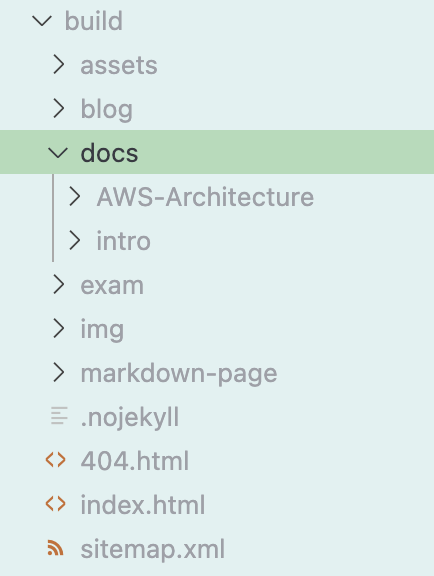
docs/intro 這個路由對應的實際文件是 docs/intro/index.html,當我在首頁點擊intro鏈接之後,Docusaurus的React路由在前端接管了導航,沒有發送HTTP請求給CloudFront。
但是當我刷新頁面之後,頁面會發送實際的HTTP請求到CloudFront,請求的路徑是 /docs/intro,CloudFront會去S3桶裡尋找這個路徑對應的文件,但是S3桶裡沒有 /docs/intro 這個文件,只有 /docs/intro/index.html,所以CloudFront返回403 Access Denied錯誤。
在使用 OAC(Origin Access Control)私有訪問的情況下,S3 對於找不到的對象返回的是 403 Access Denied,而不是直觀的 404 Not Found。這是因為從 S3 的角度看,它無法區分「對象不存在」和「你沒權限訪問」——統一都用 403 來回應,避免洩露 bucket 裡的對象信息。
解決方案一
最簡單的方案是告訴 CloudFront:遇到 403/404 時,把 /index.html 返回給用戶,讓前端路由接管。
custom_error_response {
  error_code         = 403
  response_code      = 200
  response_page_path = "/index.html"
}

custom_error_response {
  error_code         = 404
  response_code      = 200
  response_page_path = "/index.html"
}
解決方案二
更好的做法是在請求到達S3之前,就把URL自動改寫為正確的格式。CloudFront Function可以在邊緣節點執行輕量級的JavaScript代碼,適合做這件事。
resource "aws_cloudfront_function" "rewrite_uri" {
  name    = "rewrite-uri"
  runtime = "cloudfront-js-2.0"
  publish = true
  code    = <<-EOT
    function handler(event) {
      var request = event.request;
      var uri = request.uri;

      if (uri.endsWith('/')) {
        request.uri += 'index.html';
      } else if (!uri.includes('.')) {
        request.uri += '/index.html';
      }

      return request;
    }
  EOT
}
邏輯很簡單,如果請求的路徑是以 /docs/intro 結尾的話,就自動加上 /index.html,這樣就能正確地找到對應的文件了。
然後在cahce_behavior裡面把這個function掛上去:
function_association {
  event_type   = "viewer-request"
  function_arn = aws_cloudfront_function.rewrite_uri.arn
}
配置完後,清除一下CloudFront的緩存,刷新頁面就不會再出現403錯誤了。
aws cloudfront create-invalidation \
  --distribution-id YOUR_DISTRIBUTION_ID \
  --paths "/*"